Security software, explained
TotalAV explained: how antivirus software actually works, and what to check before you subscribe
This article is an explainer, not a review and not a test report. We have not run TotalAV through a laboratory, and we do not publish scores or star ratings we did not earn the right to publish. What follows is a plain account of what the components of a modern security suite actually do, where each one helps, where it does not, and what to verify on the vendor’s own site before you hand over a card number.
What this page is and is not
- It is an explanation of detection mechanisms, bundled features and buying pitfalls that applies to TotalAV and to every comparable suite.
- It is not a benchmark, a ranking, or a claim that one product beats another. Those claims belong to the independent laboratories listed in Sources.
- We are paid a commission when readers subscribe through the partner links on this page. That funds the site. It does not buy a conclusion — see our editorial policy.
- Where this page and the advertiser’s own information differ, the advertiser’s information prevails. Plans, prices and feature lists change without notice, and theirs is the authoritative source.
1. What TotalAV is
TotalAV is a commercial, subscription-based security suite for consumers, sold with applications for Windows, macOS, Android and iOS. Like most products in this category it is not a single program but a bundle: an anti-malware engine at the core, wrapped in a browser extension, some privacy tools and some maintenance utilities.
The vendor markets, depending on the plan, real-time malware scanning, a web-protection browser extension, a VPN, a password vault, a data-breach lookup and disk clean-up tools. We deliberately do not reproduce a feature matrix or a price here, because both differ by tier, by platform and by promotion, and any figure we printed today would be wrong within weeks. Open the vendor’s own plan comparison and read what your specific tier includes before you buy — the features people assume are in every plan, particularly the VPN and the password vault, are commonly reserved for the higher ones.
One thing worth understanding at the outset: on the desktop, almost all consumer security suites are built around the same handful of detection techniques. The differences that matter are how well each vendor executes them, how much of your machine they consume, what the renewal costs, and what the software does with the very broad visibility it necessarily has over your files and browsing.
2. How malware detection really works
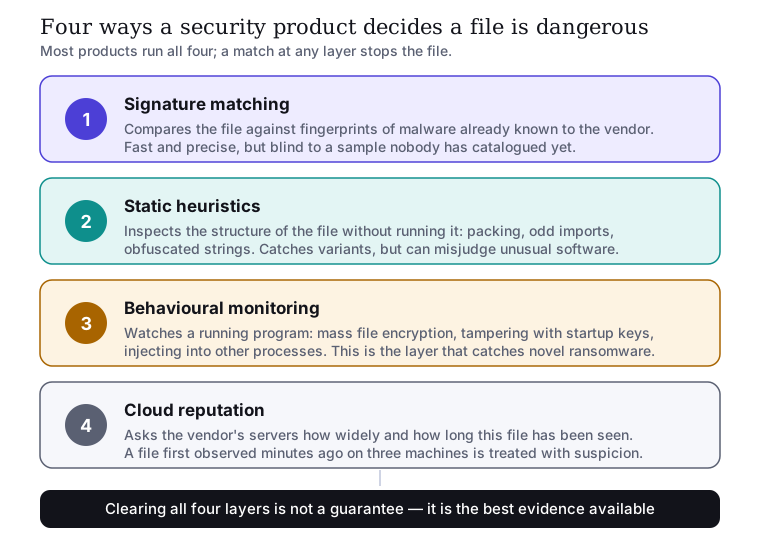
“Antivirus” is a historical name. No serious product today relies on a virus signature list alone. Four techniques run together, and a product’s protection score is essentially a measure of how well they cover for one another.
Signature matching
The engine hashes a file, or extracts characteristic byte patterns from it, and compares the result against a list of samples the vendor has already catalogued. It is exact, cheap and produces almost no false alarms. Its weakness is structural: it can only recognise what somebody has already seen and catalogued. Attackers repack and recompile constantly precisely to defeat it, which is why signature coverage on its own has not been sufficient for well over a decade.
Static heuristics
The engine inspects the structure of a file without executing it — how it is packed or encrypted, which system functions it imports, whether its strings are obfuscated, whether its resources look generated. This generalises: one rule can catch a whole family of variants. The trade-off is false positives, because legitimate software sometimes does unusual things too. Installers, game anti-cheat drivers and niche developer tools are frequent casualties.
Behavioural monitoring
The engine watches programs as they run and intervenes on sequences of actions that ordinary software has no reason to perform: enumerating and encrypting files across the whole user profile, writing itself into the startup sequence, injecting code into another process, deleting the operating system’s own shadow copies. This is the layer that catches ransomware nobody has ever seen before, and it is the layer that separates products in real-world testing. It works after execution has started, which is why good products pair it with rollback of the changes a blocked process already made.
Cloud reputation
Before allowing an unfamiliar executable, the product asks the vendor’s servers what is known about that exact file: how many machines have seen it, for how long, whether it is digitally signed and by whom. A file first observed forty minutes ago on three computers worldwide is treated very differently from one that has been on ten million machines for four years. This is effective and fast — and it is also the feature that makes a security product’s privacy policy worth reading, because it implies a running conversation between your machine and the vendor about what is on it.
A caveat worth keeping. No combination of these techniques reaches one hundred per cent, and any marketing that implies otherwise — from any vendor — should be read as marketing. Detection rates in the high nineties are normal for reputable products in laboratory conditions; the gap between that and perfection is exactly why the rest of this article exists.
3. Where each control breaks the chain
It helps to stop thinking of an infection as a single event and to see it as a sequence. Each stage is an opportunity to interrupt, and different controls interrupt at different points.
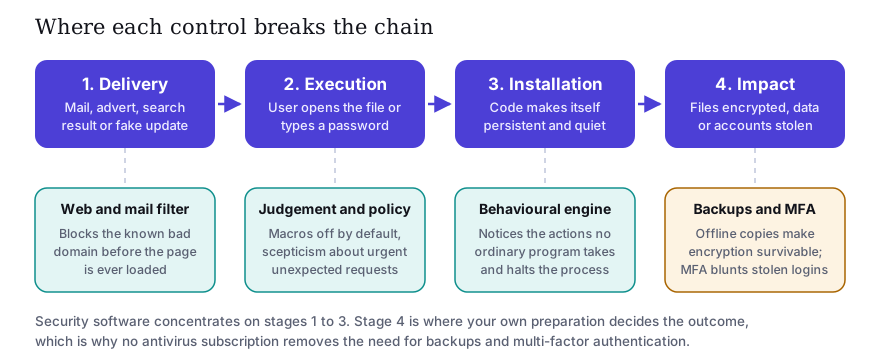
The practical consequence is the one vendors are least keen to put on a landing page: a subscription covers stages one to three. It does not cover stage four. If ransomware does get through, what determines whether the week is an inconvenience or a catastrophe is whether you have a backup you have actually restored from, and whether your email account is protected by something more than a password.
4. Real-time protection: what it does and does not cover
“Real-time protection” means the engine hooks the operating system’s file and process operations, so that a file is examined at the moment it is written, opened or executed rather than during a scheduled scan. Every credible product has it, and it should be left on.
What it does not do is worth being precise about:
- It does not stop you from typing. If you enter your bank password into a convincing fake page, no scanner has anything to scan. Web filtering may catch the page; the malware engine will not.
- It does not protect accounts that live elsewhere. A breach of a service you use has nothing to do with the software on your laptop.
- It is markedly weaker on iOS. Apple’s sandboxing prevents any third-party app from scanning other apps’ files or memory. An iOS “antivirus” app is, in practice, a web filter, a VPN client and a breach-alert tool. This is a limitation of the platform, not of any particular vendor, and it applies to every security app in the App Store.
- It cannot repair trust. Once a machine has been fully compromised, cleaning it is a best effort. For a serious infection, reinstalling the operating system is the only honest answer.
5. Web and phishing filtering
The browser extension in a suite checks addresses against a list of known malicious and fraudulent sites, and increasingly against heuristics about a page’s structure. It is genuinely useful, because most consumer incidents now begin with a link rather than an attachment. It is also inherently behind: a phishing site set up thirty minutes ago may not be on anybody’s list yet.
Which is why the durable defence is recognising the shape of the thing yourself.
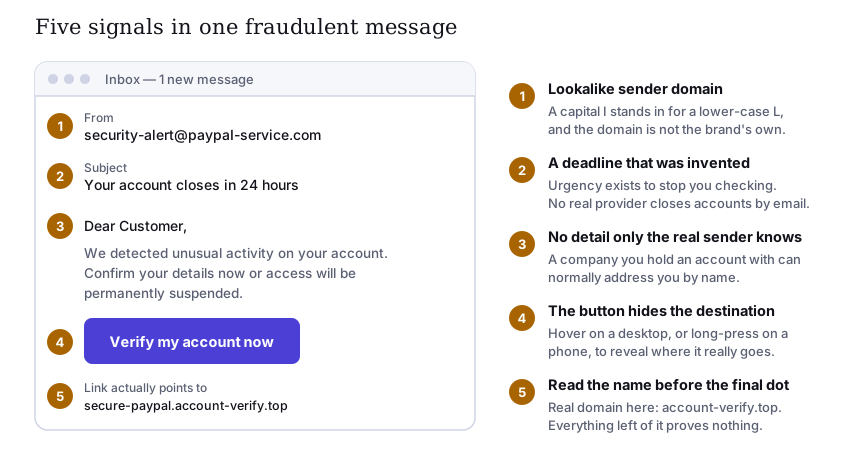
The single most reliable habit is the fifth marker. In secure-paypal.account-verify.top, the
domain is account-verify.top. Everything to the left of it is chosen freely by whoever registered it
and proves nothing at all. Our guide to spotting phishing goes through
this in more detail.
6. The bundled VPN: what it hides and what it does not
VPNs are the most oversold component of any security bundle, so it is worth being exact. A VPN encrypts traffic between your device and the VPN provider’s server, and makes the destination site see that server’s address instead of yours. That is the whole of it.
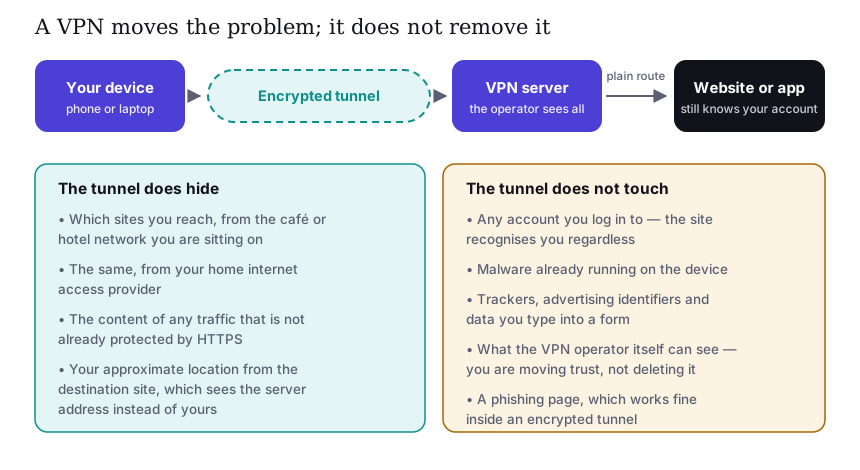
So a VPN is worth having on hotel and café networks, and it prevents your internet access provider from building a list of the sites you visit. It does not make you anonymous, does not stop malware, does not stop phishing, and does not hide anything from a service you are signed in to. And it necessarily shifts your trust from your access provider to the VPN operator, who can see the same traffic. Whether that is an improvement depends entirely on the operator’s logging practices — which is a question about their policy document, not about the technology.
One more caveat specific to bundles: a VPN included in a security suite is usually simpler than a standalone product, with fewer server locations and fewer controls. If a VPN is your main reason for buying, compare it against dedicated providers rather than assuming the bundled one is equivalent.
7. The password vault
Of everything in a typical suite, the password manager is the component with the best ratio of benefit to price — not because the software is clever, but because of what it makes possible. Password reuse is the single most productive attack technique against ordinary people, and it is the one thing an individual can eliminate outright.
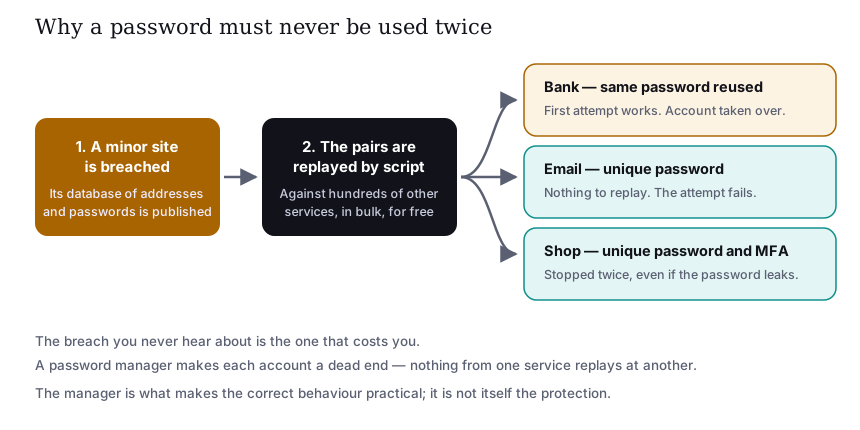
The mechanism is unglamorous. A site you barely remember signing up to is breached. Its database of addresses and passwords is published or sold. Automated tools then replay every pair against hundreds of other services. The attempt costs nothing, so it is made against everyone, indiscriminately. Wherever you reused that password, the account opens on the first try.
Two habits close this off completely: a different password for every account, which in practice requires a manager of some kind, and multi-factor authentication on your email account first — because whoever controls your email can reset everything else. See our guide to password security.
8. “System optimisation” and clean-up tools
Suites commonly bundle a disk cleaner, a startup manager, a duplicate-file finder and a browser-data cleaner, usually presented with a large number and a satisfying progress bar. A realistic assessment:
- Deleting caches and temporary files reclaims disk space. On a machine that is nearly full, this can genuinely make things feel faster. On a machine with plenty of space, it will not.
- Trimming startup items can shorten boot time and reduce background load. It is also something both Windows and macOS let you do with the tools already installed.
- “Registry cleaning” on Windows has, for many years, had no demonstrated performance benefit, and carries a small risk of breaking software. Microsoft’s own guidance has long discouraged it. Treat a large “issues found” count as a user-interface decision rather than a diagnosis.
- What actually makes an old computer faster is, in most cases, replacing a mechanical hard disk with an SSD, or adding memory. No software can substitute for either.
None of this makes the tools worthless; it makes them a convenience rather than a reason to buy.
9. What your computer already has
An honest comparison has to start from what you get for nothing.
| Platform | Built in | What a paid suite typically adds |
|---|---|---|
| Windows 10 / 11 | Microsoft Defender Antivirus, on by default when no other product is installed, with real-time protection, cloud lookup, a firewall and SmartScreen reputation filtering in Edge. | Cross-browser web filtering, a VPN, a password vault, breach monitoring, support you can telephone, and one console across all your devices. |
| macOS | XProtect signature scanning, Gatekeeper signature and notarisation checks, and the Malware Removal Tool, all built into the operating system. | The same additions, plus broader scanning of files that Apple’s own components do not examine. |
| Android | Google Play Protect scanning of installed apps. | Web and SMS filtering, app-permission auditing, anti-theft features. |
| iOS / iPadOS | Strict app sandboxing and App Store review; third-party apps cannot scan other apps. | Web filtering, a VPN and breach alerts. There is no meaningful file scanning available to anyone. |
The fair conclusion is not “paid products are pointless”. It is that the marginal detection improvement over the built-in baseline is smaller than most advertising implies, and that the real case for a paid suite is usually the bundle, the multi-device licence and the support — not a dramatic gap in malware blocking. Decide whether that bundle is worth the renewal price to you.
10. How to read independent laboratory results
Three organisations test consumer security products publicly and publish their methods: AV-TEST in Germany, AV-Comparatives in Austria and SE Labs in the United Kingdom. Their reports are free to read. A few things to know before you do:
- Read the current year only. A product’s standing can change in a year; a certificate from three years ago says nothing about today.
- Look at three scores, not one. Protection, performance (how much the product slows the machine) and usability or false positives. A product that blocks everything, including your own software, is not a good product.
- Real-world tests beat file-detection tests. A “real-world protection” test runs live malicious URLs against the full product; a static file scan only exercises the signature engine.
- Not every product is in every test. Participation is partly at the vendor’s discretion, and absence from a table is not the same as a poor result — but it does mean you have less to go on.
- Be sceptical of certificates on marketing pages, including ones reproduced by review sites. Go to the laboratory’s own site and find the test.
We do not reproduce scores for TotalAV or any other product here, because scores go out of date and we would rather send you to the source than become a stale copy of it. The laboratories are linked under Sources.
11. Price, renewal and cancellation — the part that causes complaints
Consumer security software is sold with heavy first-year discounting. The overwhelming majority of complaints about this whole product category concern billing rather than protection, and they follow a pattern worth knowing before you subscribe.
- The advertised price is usually an introductory one. The renewal is typically charged at a substantially higher rate. Find the renewal price in the terms before you buy, not a year later.
- Subscriptions renew automatically by default. Locate the cancellation control in the account area and confirm you can find it before paying.
- Check the refund window and what conditions attach to it. It is in the vendor’s terms of sale.
- Your statutory rights are separate from the vendor’s policy. Under EU consumer law, distance contracts generally carry a fourteen-day right of withdrawal. For digital content and services supplied immediately, that right can be lost if you gave express consent to immediate performance and acknowledged the consequence at checkout — which is exactly what the tick-box at the payment step usually is. Read it rather than clicking past it. Your national consumer authority is the place to check your position.
We are not the seller. slovaris.online does not sell, bill, support or refund anything. Any contract you enter into is with the advertiser, on their terms. Questions about price, billing, cancellation or refunds must go to them, not to us.
12. Where a security suite actually sits
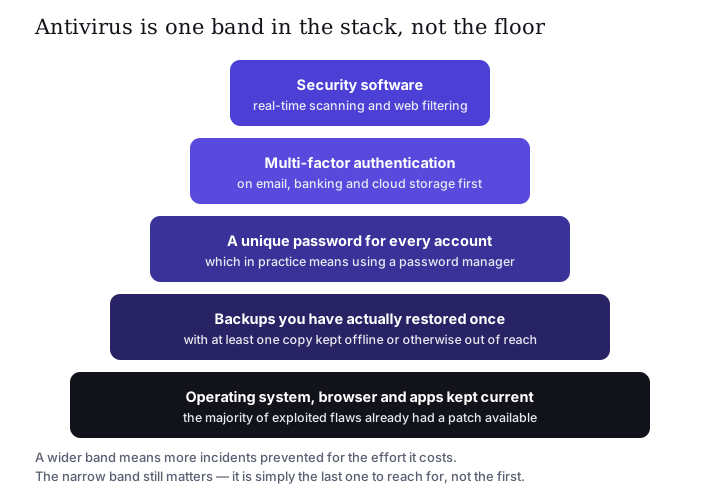
If you do only one thing after reading this, make it one of the wide bands. Turn on automatic updates. Set up multi-factor authentication on your email account. Arrange a backup and then actually restore a file from it, to find out whether it works. These cost nothing, and they prevent more harm per hour spent than any subscription.
A paid suite is a reasonable addition on top of that, particularly if you want one licence covering a household of mixed devices, or if a password manager and a VPN in one subscription suits you better than assembling them separately. It is a poor substitute for the layers beneath it.
13. Seven checks before you pay
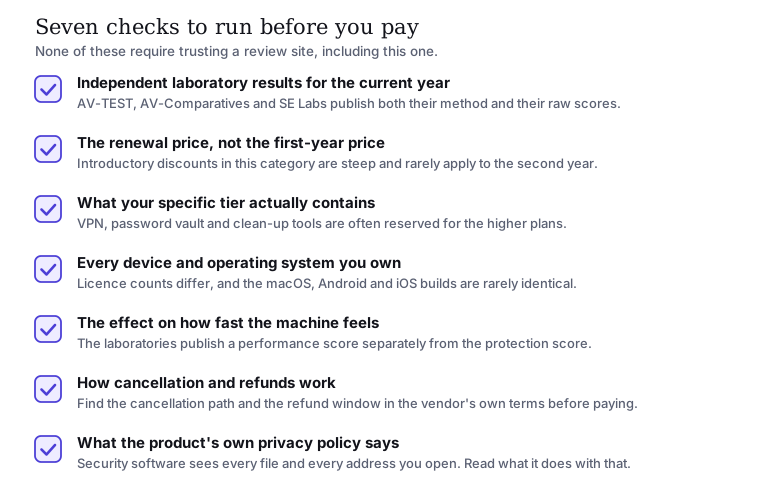
Run these against TotalAV, and against anything you compare it with. Every one of them is answerable from primary sources: the vendor’s own pages and the laboratories’ own reports.
14. A summary, without a score
TotalAV is a mainstream consumer security suite of the common type: an anti-malware engine plus a set of privacy and maintenance extras, sold by subscription across several tiers. Whether it is right for you depends on questions we cannot answer from here — which devices you need covered, whether you would use the bundled VPN and password vault, how the current laboratory results look on the day you read this, and what the renewal price is.
What we will say plainly is what we will not: we will not tell you it is the best, because we have not tested it and neither has anyone who writes a sentence like that without a laboratory behind it. We will not print a star rating we invented. And we will not pretend that the partner links on this page are not partner links.
If you take nothing else away: updates, backups, unique passwords and multi-factor authentication prevent more harm than any product you can buy. Add a suite on top if the bundle suits you — and check the renewal price first.
15. Sources and further reading
- AV-TEST Institute — independent tests of antivirus software. av-test.org
- AV-Comparatives — independent testing, including real-world protection and performance tests. av-comparatives.org
- SE Labs — independent security testing and published methodology. selabs.uk
- Anti-Malware Testing Standards Organization (AMTSO) — testing standards and a directory of compliant tests. amtso.org
- Microsoft — documentation for Microsoft Defender Antivirus. learn.microsoft.com
- Apple — Platform Security guide, covering XProtect, Gatekeeper and notarisation. support.apple.com
- ENISA — the European Union Agency for Cybersecurity, threat landscape reporting. enisa.europa.eu
- UK National Cyber Security Centre — practical guidance for individuals and small organisations. ncsc.gov.uk
- Your Europe — official summary of EU consumer rights for online purchases, including withdrawal. europa.eu
- TotalAV — the advertiser’s own site, authoritative for plans, prices and terms. totalav.com (partner link)
Trademark notice. TotalAV is a trademark of its respective owner. slovaris.online is not affiliated with, endorsed by, sponsored by or otherwise connected to TotalAV or its operator. Other product and company names mentioned are the trademarks of their respective owners and are used for identification only.
Accuracy and corrections. This article describes general mechanisms and deliberately avoids figures that date quickly. Where anything here diverges from the advertiser’s own published information, the advertiser’s information prevails. If you find an error, write to info@slovaris.online and we will correct it and log the change on our corrections page.
Illustrations. All seven diagrams on this page were drawn specifically for slovaris.online as original SVG files. They contain no product screenshots, no vendor logos and no stock photography.
Written by Ava Johnson, responsible editor, Cape Coral Inc., s.r.o.. Published 22 September 2026 and last reviewed 22 September 2026.